Skyscraper Puzzle: Free Online Logic Puzzles
Place buildings of height 1 to n so the edge numbers match what you can see. Play online or print worksheets.
Recent
Your last 10 settings, saved only in this browser. Nothing is uploaded.
This free skyscraper puzzle maker, also called a towers puzzle, runs in your web browser with no sign-up and nothing to install. Puzzles are made on your device and nothing is uploaded, so you can start one straight away.
The page opens on a 5×5 puzzle at Medium difficulty. You can choose grids from 4×4 up to 7×7 and one of three levels: Easy, Medium or Hard. Each new puzzle is built from scratch with the settings you choose, so you can keep going as long as you like. You can also print worksheets with answer pages.
You can also copy a link that reopens the exact puzzle on another device.
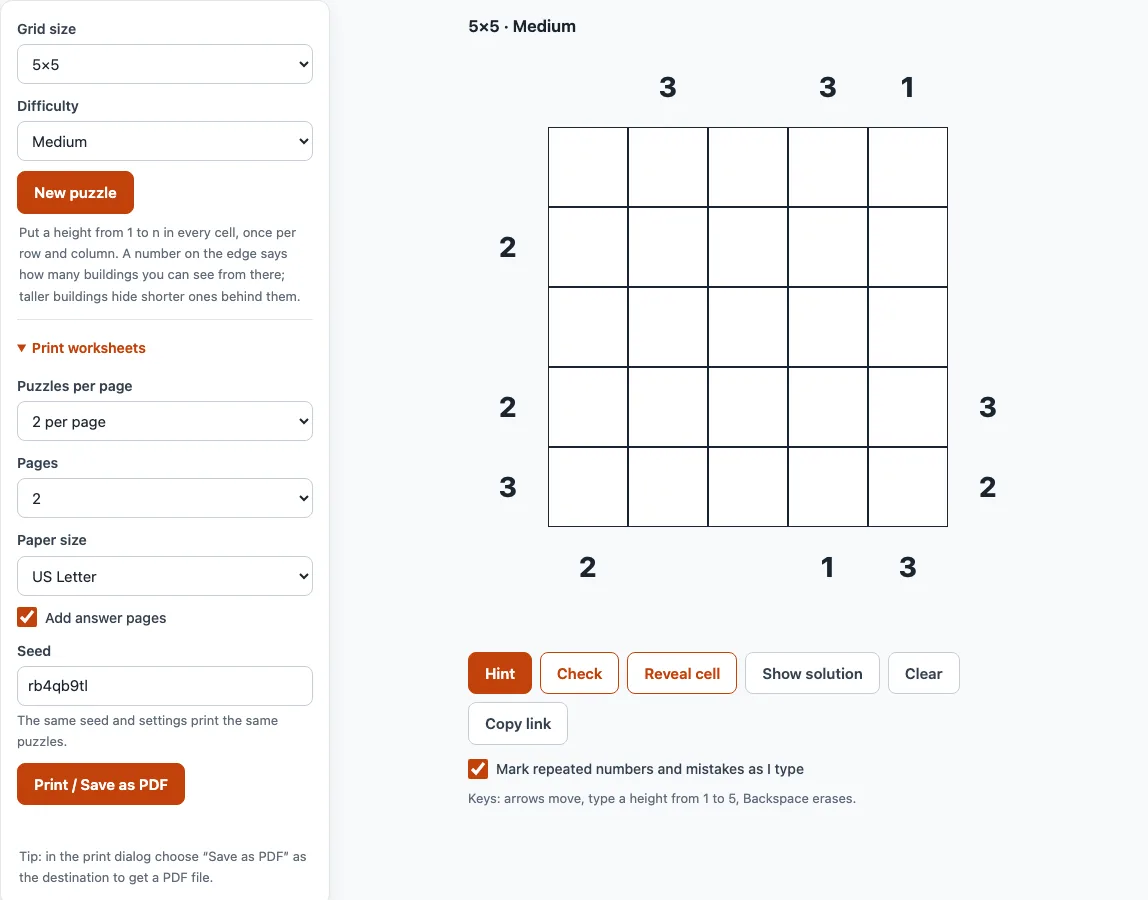
How to use the Skyscraper Puzzle
- Pick a grid size and a difficulty. Changing either one makes a new puzzle. Press New puzzle to get another puzzle with the same settings.
- Click a cell and type its number. The arrow keys and Enter move you between cells, and Backspace erases an entry.
- Look at the grey cells first. They are given numbers and cannot be changed, so build your reasoning from them.
- Keep the box Mark repeated numbers and mistakes as I type ticked. It is on by default, so conflicting entries show up while you work.
- If you are stuck, press Hint. It places one correct entry. If some of your numbers are wrong, it marks them instead and asks you to fix them first.
- Press Check to see how many numbers do not match the solution. Those numbers are marked on the grid.
- Press Reveal cell to fill the selected cell, or the first wrong or empty one. Press Show solution when you want the full answer.
Clear removes your entries but keeps the grey givens, so you can start again from the same position. Copy link gives you a link that reopens exactly this puzzle, which is useful for sharing it or returning to it later.
How do you play a skyscraper puzzle?
Fill every cell with a building height from 1 to n, where n is the grid size, so that each height appears exactly once in every row and every column. The numbers around the edges are clues: each one says how many buildings you can see when you look along that row or column from that side.
A taller building hides every shorter building behind it. In the row 2, 1, 4, 3, looking from the left you see 2 buildings (the 2 and the 4). Looking from the right you also see 2 (the 3 and the 4). The row 1, 2, 3, 4 shows 4 from the left and 1 from the right.
How do you solve a skyscraper puzzle?
Start with the edge clues, since they limit where the tallest buildings can stand. Combine rows and columns as you would in sudoku, crossing out any height that already appears in that line.
- A clue of 1 means the tallest building (n) stands next to that edge.
- A clue of n means the heights rise 1, 2, 3 up to n from that edge.
- A clue of c means n cannot stand in the first c−1 cells, because at most one more building becomes visible per cell.
- With a clue of 2, the tallest building is not in the first cell, and the first building is shorter than all the later visible ones.
- The two clues at the ends of a row add up to at most n+1, so two large clues on opposite ends of one row cannot both be right.
Can I print skyscraper puzzles?
Yes, from the Print worksheets section next to the puzzle. Choose puzzles per page (1, 2 or 4), the number of pages, and the paper size (US Letter or A4). Keep Add answer pages on to get answers after the puzzles, with the filled-in numbers in colour.
Press Print / Save as PDF, then choose Save as PDF as the destination to get a file. Using the same seed and settings prints the same puzzles again. Each sheet shows a title with the puzzle name, size and level, a one-line rule, and the seed in the footer.
What size and difficulty can I choose?
You can choose any grid from 4×4 to 7×7 and one of three levels: Easy, Medium or Hard. The page opens on a 5×5 puzzle at Medium.
Difficulty sets how many clues and given cells are shown. Easy leaves most of them, Medium about half, and Hard keeps as few as it can while the puzzle still has exactly one solution. On average, a 5×5 puzzle shows 17 clues and given cells at Easy, 12 at Medium and 8 at Hard.
Is a skyscraper puzzle like sudoku?
Partly. As in sudoku, each height appears once in every row and column, so the same row and column reasoning applies. The differences are that there are no 3×3 boxes, and the extra information comes from clues on the edges instead.
Frequently asked questions
Does every puzzle have exactly one solution?
Yes. The generator checks each puzzle with an exact solver before it is shown, so there is always a single correct answer. This is also why Hard puzzles show so few clues: they are reduced only as far as that one-solution check allows.
What does a red cell or red clue mean?
A cell turns red when a height repeats in its row or column. An edge clue turns red when the buildings already placed make its number impossible to reach, or when a finished row or column shows a different number.
Is my progress saved if I close the page?
Your progress is saved in this browser, so reloading brings the same puzzle back. A puzzle you finished is not reopened automatically, so press New puzzle when you want another one.
Can I play on a phone?
Yes. The board scales to the screen width, the number cells are large enough to tap, and the number keyboard opens when you tap a cell.
How many puzzles can I print at once?
Choose 1, 2 or 4 puzzles per page and up to 10 pages, so one print run can hold up to 40 puzzles. The seed lets you print the same set again later.
Do I need to know sudoku first?
No. The rules are short: each height once per row and column, and the edge numbers count the buildings you can see. The solving tips on this page are enough to start with a 4×4 puzzle.
Related tools
- Latin square generator: use it to make and explore the same each-number-once grid that skyscraper puzzles are built on.
- Futoshiki: try it if you like logic grids that use inequality signs instead of edge clues.
- KenKen puzzles: practise combining rows, columns and arithmetic cages in another grid puzzle.
- KenKen rules: read this if you want the rules of the KenKen puzzles before you start.
- Printable KenKen puzzles: choose this when you want paper sheets to solve away from the screen.