Numbrix: Free Number Path Puzzles
Connect 1 to the last number through the grid, each number next to the next. Play online or print worksheets.
Recent
Your last 10 settings, saved only in this browser. Nothing is uploaded.
Numbrix is a number path puzzle: you fill a grid with the numbers 1 up to the last number so that each number sits directly next to the next one. This free Numbrix tool makes new puzzles for you to solve, and it runs in your web browser. There is no sign-up and nothing to install. Each puzzle is made on your device, and nothing is uploaded.
You can choose a grid size from 4×4 to 9×9 and a difficulty of Easy, Medium or Hard. The page opens on a 6×6 puzzle at Medium. You can also set up printable sheets of Numbrix puzzles, with answer pages, so you can solve on paper.
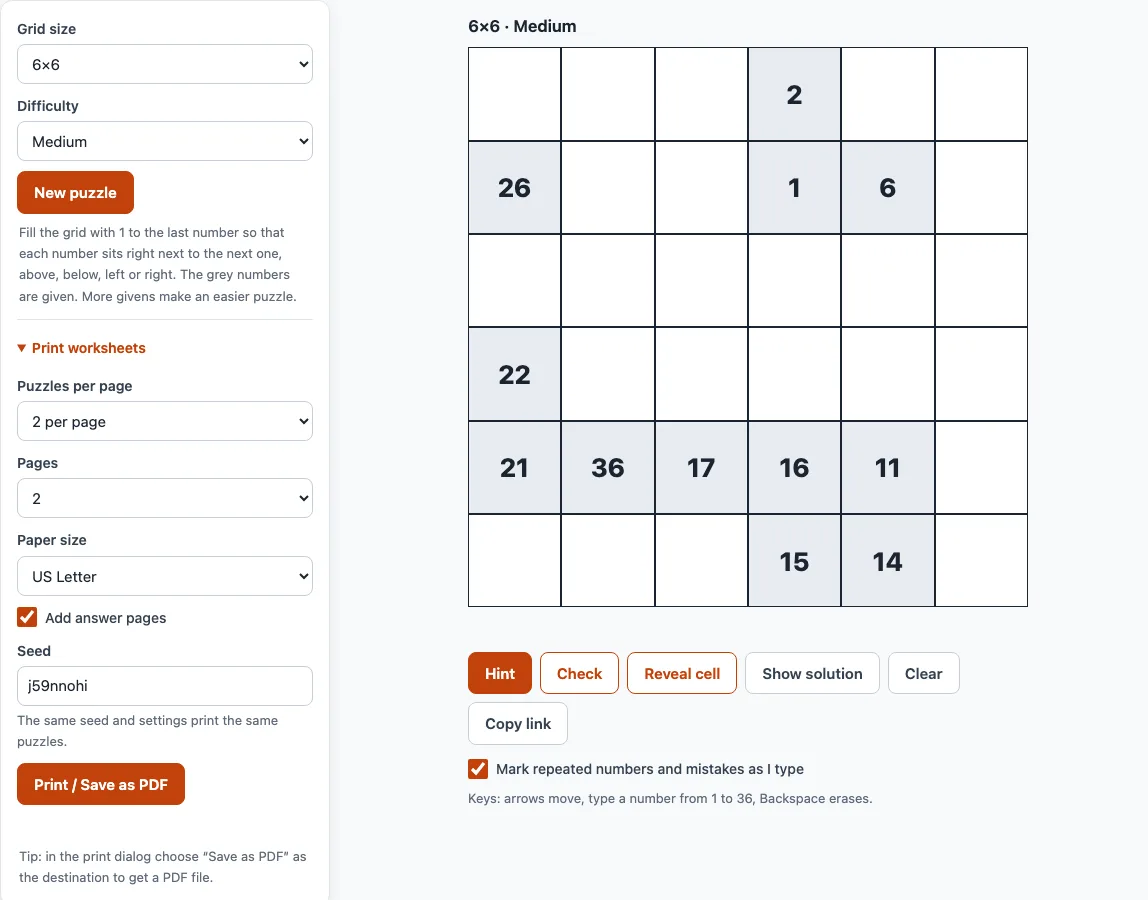
How to use the Numbrix tool
- Choose a Grid size from 4×4 to 9×9, and a Difficulty of Easy, Medium or Hard. Changing either one makes a new puzzle.
- Look at the grey cells. These are the given numbers, and they cannot be changed. The number 1 and the last number are always given.
- Click an empty cell and type its number.
- Move between cells with the arrow keys or Enter. Press Backspace to erase an entry.
- Keep Mark repeated numbers and mistakes as I type ticked (it is on by default). A cell turns red when the rules are broken.
- Press Check to see how many of your numbers do not match the solution. Press Hint to put one correct entry in the grid. If some of your numbers are wrong, Hint marks them and asks you to fix them first.
- Press New puzzle for another puzzle with the same settings.
On a phone, tap a cell and the number keyboard opens. Clear removes your entries but keeps the givens. Copy link creates a link that reopens exactly this puzzle. Show solution shows the full answer, and Reveal cell fills the selected cell, or the first wrong or empty one.
Press Show solution only when you want to see the full answer; Reveal cell gives away just one entry.
What is Numbrix?
Numbrix is a number path puzzle. Each number sits directly next to the next one, so the numbers form one continuous path through the grid. Some numbers are given, and you work out the rest from them.
How do you play Numbrix?
Put the numbers 1 to the last number into the grid. The last number is 16 on a 4×4 grid, 36 on 6×6 and 81 on 9×9. Each number must sit directly above, below, left or right of the next one. Diagonal neighbours do not count. The path visits every cell exactly once.
The tool marks mistakes for you. A cell turns red when a number is entered twice, or when two consecutive numbers, such as 7 and 8, are in cells that do not touch.
How do you solve a Numbrix puzzle?
Start from the given numbers and look for patterns rather than guessing.
- Look for two givens whose difference equals the number of steps between their cells. For example, if 12 and 14 have one cell between them, then 13 must sit in a cell that touches both.
- Use the corners and edges. A corner cell has only two neighbours and an edge cell has three, so its number is usually next to the numbers just before and after it.
- Colour the grid like a chessboard. Every step moves to a cell of the other colour, so odd numbers sit on one colour and even numbers on the other. One given number tells you the colour of every other number.
- If a free cell has only one free neighbour left, it must hold the first or last number of the stretch you are filling. This shows where a run must end.
- Count steps. If two givens are further apart in the numbers than in the grid, the path must wiggle between them. If the gap equals the distance, the path is a straight shortest route.
Can I print Numbrix puzzles?
Yes. The print settings are in the Print worksheets section next to the puzzle. Choose 1, 2 or 4 puzzles per page, and the number of pages from 1 up to 10. Choose US Letter or A4 paper size. Answer pages are on by default. They come after the puzzle pages, with six answers to a page and the filled-in numbers in colour.
Press Print / Save as PDF to open the browser print dialog. Choose “Save as PDF” as the destination to get a file. Each sheet shows a title with the puzzle name, size and level, a one-line rule, and the seed in the footer.
How many numbers are given at each level?
The number of givens depends on grid size and difficulty. These are the average numbers given:
| Grid | Easy | Medium | Hard | Cells |
|---|---|---|---|---|
| 4×4 | 7 | 5 | 4 | 16 |
| 5×5 | 12 | 9 | 4 | 25 |
| 6×6 | 17 | 12 | 6 | 36 |
| 7×7 | 23 | 17 | 7 | 49 |
| 8×8 | 29 | 22 | 11 | 64 |
| 9×9 | 37 | 28 | 13 | 81 |
The generator builds a random path, then removes given numbers one at a time. It keeps a number whenever taking it away would allow a second solution. Easy stops while about 46 percent of the numbers are still given, and Medium stops at about 34 percent. Hard removes as many as it can.
Can I make my own Numbrix-style puzzles or a whole set?
The tool makes puzzles for you. It does not let you type in your own grid. You can choose the grid size and difficulty, and press New puzzle for another one. To get a whole set on paper, set the puzzles per page and number of pages before you print. The same seed and settings print the same puzzles again.
Is this the official Numbrix?
No. This site is independent and is not affiliated with the published Numbrix puzzle series, which was created by Marilyn vos Savant. The tool uses its own generator, and every puzzle is made on your device.
Frequently asked questions
Does each puzzle have only one solution?
Yes. The generator checks each puzzle with an exact solver before it is shown, so every puzzle has exactly one solution.
What do the red cells mean?
A red cell means the rules are broken at that cell. Either a number has been entered twice, or two consecutive numbers are in cells that do not touch. Fix the red cells and keep solving.
Is my progress kept if I close the page?
Yes. Your progress is saved in this browser, so reloading the page brings the same puzzle back. A puzzle you have finished is not reopened automatically.
Does the puzzle work on a phone?
Yes. The board scales to the screen width, and the number cells are large enough to tap.
Is there a version where diagonal steps are allowed?
Yes. Hidato-style puzzles on this site allow the next number to touch diagonally. Numbrix does not.
Which grid size should I start with?
Start with a smaller grid. A 4×4 puzzle has only 16 cells, so it is quick to learn the rules. The page opens on a 6×6 puzzle at Medium, which is a good next step.
How many puzzles can I print at once?
Choose 1, 2 or 4 puzzles per page and up to 10 pages, so one print run can hold up to 40 puzzles.
Related tools
- Hidato: use this when you want the same kind of path puzzle, but with diagonal steps allowed.
- Skyscraper puzzle: use this when you want a logic puzzle built on a grid of numbers.
- Futoshiki: use this when you want a grid puzzle that uses less-than and greater-than signs.
- Latin square generator: use this when you want to make grids where each number appears once per row and column.
- KenKen puzzle generator: use this when you want a grid puzzle that uses arithmetic cages.