Latin Square Generator
Pick a size and symbols to make a random Latin square, or a fill-in puzzle with one solution.
Recent
Your last 10 settings, saved only in this browser. Nothing is uploaded.
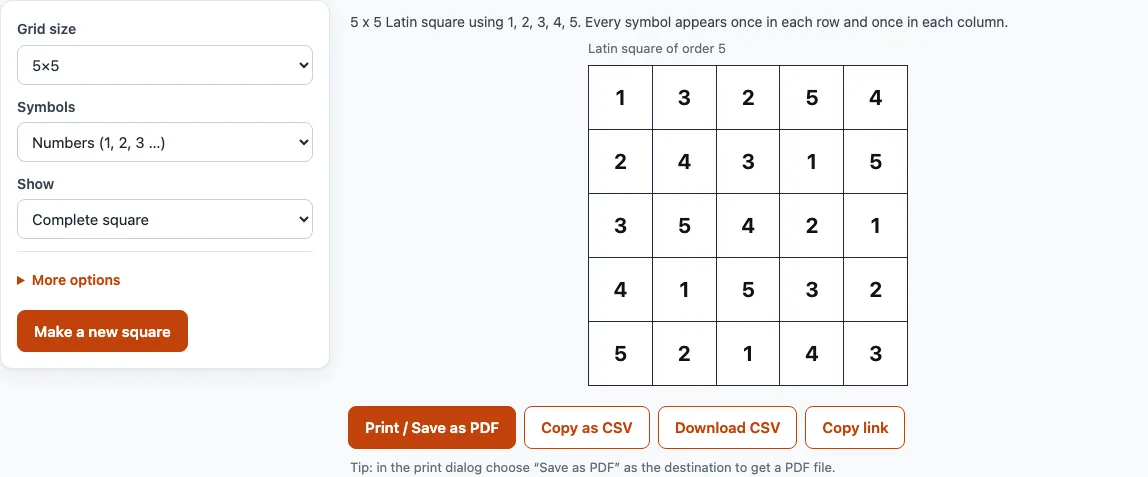
How to use the Latin Square Generator
- Choose a size from the size menu. The options run from 2x2 to 12x12.
- Open the Symbols menu and choose Numbers (1, 2, 3 …), Letters (A, B, C …) or My own labels.
- If you chose My own labels, type your labels separated by commas, for example Drug A, Drug B, Placebo.
- Open the Show menu and choose Complete square or Fill-in puzzle.
- If you chose Fill-in puzzle, open Cells already filled and pick Many (about 60%), Some (about 40%) or Few (about 25%).
- Read the status line, which tells you how many cells are given and how many are blank.
- Press Show answer to display the full square, and Hide answer to hide it again.
To use the result elsewhere, press Copy as CSV and paste it into a spreadsheet. Each row of the square becomes one line, with the cells separated by commas, and blank puzzle cells are left empty. Download CSV saves the same data as a file named after the size and the seed. If you are in puzzle mode and the answer is showing, the CSV holds the full square instead of the puzzle.
Open More options to set the paper size (US Letter or A4) and to type a seed. Press Make a new square to get a new random seed. The buttons Print, Copy as CSV, Download CSV and Copy link work on the square you have on screen.
What is a Latin square?
A Latin square is an n x n grid filled with n different symbols, so that each symbol appears exactly once in every row and exactly once in every column. The number n is the order of the square, and this tool makes orders 2 to 12.
Here is a latin square example of order 3 using letters:
A B C
B C A
C A B
Every row and every column contains A, B and C exactly once. The tool builds its squares from the cyclic square, where each row is the previous row shifted one place. For order 4 that is 1 2 3 4 / 2 3 4 1 / 3 4 1 2 / 4 1 2 3.
How many Latin squares are there?
The number grows very quickly with the order. Counting every arrangement, there are 2 Latin squares of order 2, 12 of order 3 and 576 of order 4. For order 5 the total is 161,280, and for order 6 it is 812,851,200 (OEIS sequence A002860). Because of this, even a small size gives many possible squares, and the same seed always brings back the same one. A seed is useful when you need to document exactly which square you used in a class, a report or an experiment.
How is a Latin square used in experimental design?
A Latin square lets you test n treatments while controlling for two nuisance factors, the rows and the columns, using only n x n runs. Each treatment appears once in every row and once in every column, so no treatment is favoured by either factor.
For example, with three treatments you could let the rows be three days and the columns be three machines. Each treatment is then tested once on each day and once on each machine, using nine runs in total. In a real experiment, the labels for rows, columns and treatments should be randomised, which is why the tool shuffles them rather than using the plain cyclic square.
Frequently asked questions
How do I generate a random Latin square?
Set the size and symbols, then press Make a new square to get a new random seed. The tool starts from the cyclic square and shuffles the rows, the columns and the symbol assignment with a seeded random generator. This is the standard randomisation for Latin square experimental designs, but it does not sample evenly from every possible Latin square of that size.
Can I use my own labels such as treatment names?
Yes. Choose My own labels under Symbols and type the labels separated by commas, such as Drug A, Drug B, Placebo. If you give fewer labels than the size needs, the missing ones fall back to numbers. A repeated label gets a * added, and each label is cut to 12 characters.
Can I print a Latin square puzzle?
Yes. Set Show to Fill-in puzzle and press Print. The puzzle prints first, followed by an answer page. Choose Save as PDF in the print dialog if you want a PDF file.
Is a Latin square the same as sudoku?
No. A sudoku is a 9x9 Latin square with an extra rule: each symbol must also appear exactly once in every 3x3 box. A Latin square has only the row and column rules. KenKen-style puzzles on this site also fill a Latin square, with cages added.
Does every fill-in puzzle have only one solution?
Yes. Cells are blanked one at a time, and a blank is kept only if a solver confirms that exactly one completion remains. The status line shows how many cells are given and how many are blank.
Related tools
- KenKen puzzles online: play KenKen puzzles in your browser when you want a logic puzzle with cages and arithmetic targets.
- KenKen puzzle generator: create new KenKen puzzles when you want a fresh grid to solve.
- KenKen rules: read the rules when you are new to cages and operations.
- Printable KenKen: print KenKen puzzles on paper when you want to solve away from the screen.
- 4x4 KenKen: try the smallest KenKen size when you want a quick puzzle.
- KenKen solver: check a KenKen puzzle’s solution when you are stuck on a grid.