Hidato: Free Diagonal Number Path Puzzles
Run the numbers from 1 to the last one through the grid, each touching the next, diagonals allowed. Play online or print.
Recent
Your last 10 settings, saved only in this browser. Nothing is uploaded.
Hidato is a number path puzzle. You fill a square grid with consecutive numbers so that each number touches the next one, either along an edge or diagonally at a corner. This free Hidato tool runs in your web browser. There is no sign-up and nothing to install, and each puzzle is made on your device, so nothing is uploaded.
Choose a grid size from 4×4 to 9×9 and a difficulty of Easy, Medium or Hard. The page opens on a 6×6 puzzle at Medium. Enter your numbers in the grid below and check your work as you go.
You can also print worksheets with answer pages, and copy a link that reopens the exact puzzle on another device.
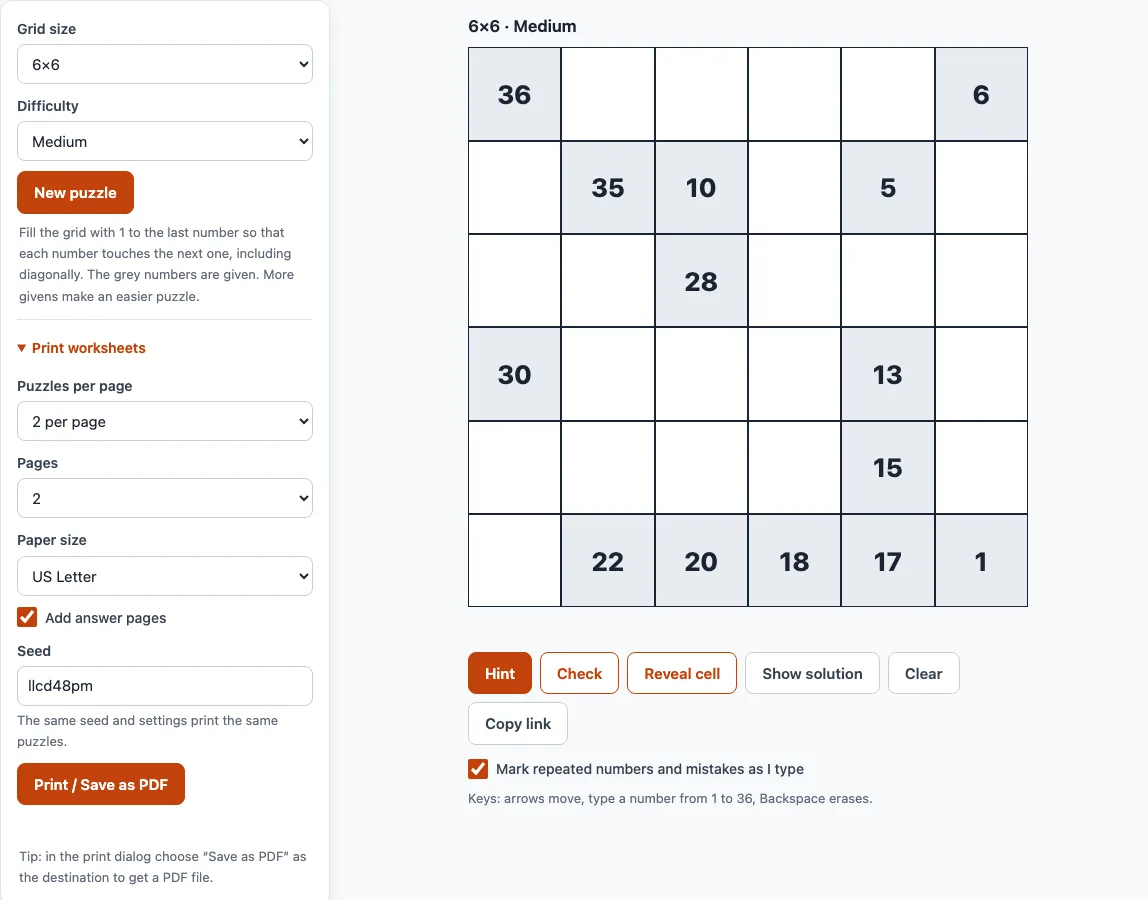
How to use the Hidato tool
- Pick a Grid size from 4×4 up to 9×9. Changing it makes a new puzzle.
- Pick a Difficulty: Easy, Medium or Hard. Changing it also makes a new puzzle.
- Click a cell and type its number. Grey cells are given and cannot be changed.
- Move between cells with the arrow keys or Enter. Press Backspace to erase an entry.
- Keep Mark repeated numbers and mistakes as I type switched on (it is on by default). A cell turns red when a number is entered twice or when two consecutive numbers do not touch.
- Press Check to see how many of your numbers do not match the solution. Press Hint to place one correct entry. If some of your numbers are wrong, Hint marks them instead and asks you to fix them first.
- Press Reveal cell to fill the selected cell (or the first wrong or empty one), or Show solution to see the full answer. Clear removes your entries and keeps the givens.
Press New puzzle for another puzzle with the same settings. Copy link gives you a link that reopens exactly this puzzle. Your progress is saved in this browser, so reloading brings the same puzzle back. A puzzle you finished is not reopened automatically. On a phone, the board scales to the screen width and the number keyboard opens when you tap a cell.
What is Hidato?
Hidato is a number path puzzle played on a square grid. You place the numbers from 1 up to the last number so that each number touches the next one, sharing an edge or a corner. The path visits every cell once.
The number 1 and the last number (16 on a 4×4, 36 on a 6×6, 81 on a 9×9) are always given. Some numbers in between are given too, and those grey cells cannot be changed. Because a path can step in any of the eight surrounding cells, a corner cell has three neighbours, an edge cell has five, and an inner cell has eight. Hard puzzles keep almost as many givens as Medium ones, because diagonal moves allow many more routes.
How do you solve a Hidato puzzle?
Start with the givens, since they fix the path at a few points. Then use these checks to place the rest:
- Take two givens whose numbers are far apart. Count the steps between them. If the number of steps equals the distance between their cells (a diagonal step counts as 1), the path between them is a shortest route with no spare room. If there are more steps than the distance, the path has room to wander.
- If two givens differ by 2 and their cells are 2 steps apart, the number between them must go on a cell that touches both. Find that cell.
- Check corners and edges early. They have fewer neighbours, so fewer numbers can fit there.
- When a cell has only one free neighbour left, it is the end of a stretch you are filling. Follow that stretch from the cell.
- If a free cell can no longer be reached by any number still missing, an earlier guess was wrong. Go back to the last guess and try another cell.
Work from both ends too: the numbers next to 1 and next to the last number are often the easiest to place, because a stretch of path has to connect to them.
Frequently asked questions
How do you play Hidato?
Fill every cell with a number so that the numbers run from 1 to the last number and each one touches the next, by an edge or a corner. The path must visit every cell exactly once. Use the given numbers as fixed points and work out the rest.
How is Hidato different from Numbrix?
In Numbrix, the next number must share an edge with the previous one, so each number has four possible neighbours. In Hidato, the next number may also touch at a corner, which gives eight neighbours. That is why Hidato puzzles need more given numbers and their paths twist more.
Can I print Hidato puzzles?
Yes. The Print worksheets section next to the puzzle has settings for puzzles per page (1, 2 or 4), pages, and paper size (US Letter or A4). Answer pages are added by default, six answers to a page, with the filled-in numbers in colour. Use the same seed and settings to print the same puzzles again, then press Print / Save as PDF and choose Save as PDF as the destination to get a file.
Is this the official Hidato?
No. Hidato is the name of a published puzzle series, but this site is independent and not affiliated with it. The grids here are always full squares, while classic Hidato boards can have holes.
Does every puzzle have exactly one solution?
Yes. The generator builds a random path through every cell, then removes given numbers one at a time, keeping any number whose removal would allow a second solution. Each puzzle is checked with an exact solver before it is shown.
Is my progress saved if I close the page?
Your progress is saved in the browser you are using. Reloading the page brings the same puzzle back. A puzzle you finished is not reopened automatically.
Related tools
- Numbrix-style number path puzzles: use this if you want the same path idea with edge-only moves and no diagonals.
- Skyscraper puzzle: use this for a logic grid where the clues are heights seen from the edges.
- Futoshiki: use this for a Latin-square puzzle with greater-than and less-than clues.
- Latin square generator: use this to make grids where each number appears once per row and column.
- KenKen puzzles: use this for arithmetic grid puzzles with cages.
- KenKen rules: use this to learn how cages and operations work before you start.