Futoshiki: Free Inequality Puzzles
Play a fresh Futoshiki puzzle from 4x4 to 9x9, or print worksheets with answers.
Recent
Your last 10 settings, saved only in this browser. Nothing is uploaded.
How to play Futoshiki here
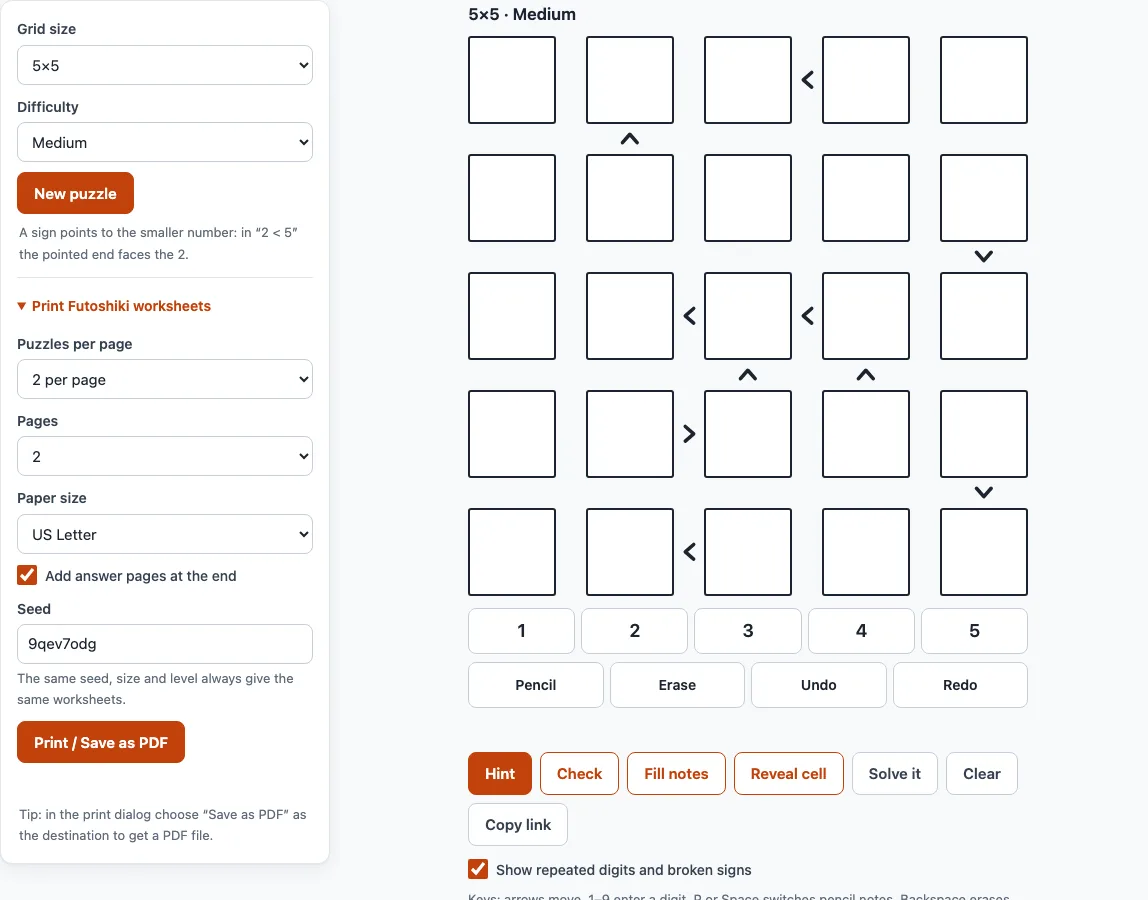
- Choose a grid size from 4x4 to 9x9 and a level (Easy, Medium or Hard). Changing either one makes a new puzzle. Press New puzzle for another one with the same settings.
- Click or tap a cell, then press a digit on the number pad or on your keyboard. Pressing the same digit again removes it. The grey cells with dark digits are the givens and cannot be changed.
- Read the signs between cells. A sign points its narrow end at the smaller number. In “2 < 5” the narrow end faces the 2, and the same idea applies to the signs above and below a cell.
- Turn on Pencil (or press P or Space) to write small notes in a cell instead of a digit. Fill notes writes every digit that still fits into all empty cells, using the signs and the digits already in each row and column.
- Press Undo or Redo (or Ctrl+Z and Ctrl+Y) to step back.
- Press Hint when you are stuck. It marks a forced cell, explains why and can place the digit.
- Press Check to count wrong cells, Reveal cell to show one, or Solve it to fill the grid.
Repeated digits and broken signs turn red while you play (a checkbox switches this off). Progress is saved in this browser, and Copy link opens the same puzzle elsewhere.
What is a Futoshiki puzzle?
Futoshiki is a logic puzzle from Japan. The name means “inequality” in Japanese. The grid is an n x n square, and the rules are short:
- Each row contains the digits 1 to n exactly once.
- Each column contains the digits 1 to n exactly once.
- Every “<” or “>” sign between two neighbouring cells must be true.
Some puzzles also give a few digits. If you know sudoku, this is the same row and column rule, but with signs instead of 3x3 boxes. You can read more about the Latin square behind the grid on the Latin square generator page of this site.
How do you solve a Futoshiki puzzle?
Start with the cells next to signs. A cell that must be smaller than a neighbour cannot hold the biggest digit n, and a cell that must be bigger than a neighbour cannot hold 1. In a 5x5 grid, the cell at the big end of “a < b” can never be 1, and the cell at the small end can never be 5.
Next look at chains. In “a < b < c” the three cells need three different digits in rising order, so in a 5x5 grid a can be at most 3 and c at least 3. A longer chain squeezes the digits even more.
Then use the usual Latin square logic. If a digit is already in a row or column, remove it from the other cells of that row and column. If a digit can only go in one cell of a row, put it there. Pencil notes help a lot here, and Fill notes does the first round for you.
Easy and Medium puzzles on this site can be solved with these steps only, so you never need to guess. A Hard puzzle may need one “what if”: try a digit in one cell, follow the signs and rows, and if it leads to a clash, that digit is ruled out. The Hint button uses the same steps and tells you which one it used.
How do I print Futoshiki puzzles?
Open Print Futoshiki worksheets in the settings panel. Choose 1, 2 or 4 puzzles per page, 1 to 10 pages, and US Letter or A4 paper. Switch on the answer option to add answer pages at the end, six answers to a page. Press Print / Save as PDF. The tool makes the puzzles one by one with a progress bar, then opens the print dialog, where you can also pick “Save as PDF”. The same seed, size and level always give the same worksheets, so you can reprint a set later.
How does the generator make sure there is only one answer?
The tool starts from a random Latin square and writes down every sign between neighbours and every digit. It then removes digits and signs one at a time, and a removal is kept only if a solver confirms that the puzzle still has exactly one solution. Easy puzzles get a few clues back so that they are gentler. If no puzzle of the exact level turns up for a small grid, the tool tells you that it is showing the closest one.
Frequently asked questions
What are the rules of Futoshiki?
Fill the grid so that each row and each column has the digits 1 to n once, where n is the grid size. Every sign between two cells must be true, so with “<” the number on the narrow side is the smaller one. Some digits are already given.
Does every puzzle have only one solution?
Yes. The generator keeps a puzzle only after a solver has checked that exactly one solution exists. A puzzle opened from a shared link is checked again when it loads, and the page warns you if it has none or more than one.
What is the difference between the Easy, Medium and Hard levels?
Easy and Medium puzzles can be solved step by step from the signs and the digits in each row and column. Easy gives extra clues. Hard has fewer clues and may need one “what if” test of a digit.
Can I print Futoshiki puzzles with answers?
Yes. Choose puzzles per page, the number of pages and the paper size under Print Futoshiki worksheets, keep the answer pages option on, and press Print. You can print up to 10 pages in one go, with 1, 2 or 4 puzzles on each page.
Is Futoshiki the same as sudoku or KenKen?
No, but they are related. All three need each digit once per row and column. Sudoku adds 3x3 boxes, KenKen-style puzzles add cages with arithmetic targets, and Futoshiki adds less-than and greater-than signs.
Does the tool save my game?
Yes, in your own browser. If you reload the page, the same puzzle comes back with your digits and notes. Nothing is sent to a server.
Related tools
- Latin square generator: make a plain Latin square or a fill-in puzzle when you want the row and column rule without signs.
- KenKen puzzles online: play calcudoku with cages and arithmetic targets when you want another number puzzle.
- KenKen puzzle generator: make several new KenKen-style puzzles at once.
- Printable KenKen: print KenKen-style sets with answers.
- KenKen rules: learn how cages work with a short lesson.